Adding 230V motion sensors to Loxone
Posted on December 27, 2017 • 3 min read • 483 words
During the construction of our house, we took home automation into account. All the wiring leads to a central meter cupboard, where even every switch has been installed separately. This also applies to the 230V motion sensors that have been placed in various locations in the house.
Now that I am ready to fully integrate Loxone into our home, the motion sensors also need to be incorporated. By default, the Loxone Miniserver does not support the use of 230V sensors. However, I still want to use these sensors.
Converting 230V switching to 24V digital inputs
As mentioned, the Loxone doesn’t have 230V inputs for sensors. To be able to use these sensors, we will need to convert the 230V signals to 24V, so that they can be used on the digital inputs of the Loxone Miniserver. We accomplish this by using a relay that can be switched by 230V. The switched connection can then be used as input for Loxone.
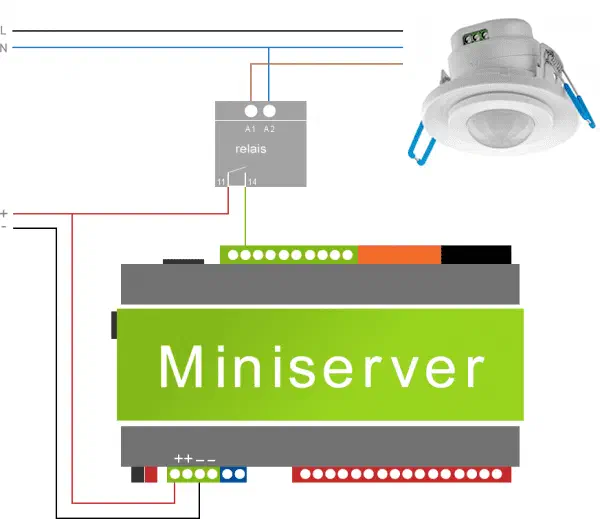 Depending on the sensor and the relay chosen, the connections may differ. In this case, we connect the sensor to 230V as usual. The connection that originally came from the lamp (a black switching wire) is now connected to the relay on the switching side (A1), and the A2 is connected to the neutral (blue wire).
Next, we connect 24V to A1 of the relay. The wire that then comes from the relay (A2) is connected to a digital connection of the Miniserver. As soon as the motion detector activates, the relay switches the 24 VDC through and the Miniserver recognizes the change at the digital input.
This could be the 24V power supply that we use to power the Miniserver, but it is advised to use a separate power supply for the switching.
Loxone Configuration
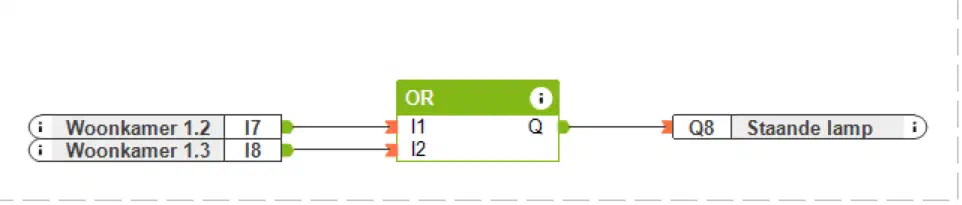
In Loxone Config, we then drag a digital input to the canvas, just like a digital output.
You can make the switching as complicated or as simple as you like. In the example above, it is a one-to-one relationship between a switch and a lamp.
The following example also contains a standard switch. By combining this with an OR block, the standard switch can be used to switch on the lights, regardless of whether motion is detected by the sensor.
Software to configure the Loxone Miniserver can be downloaded from the Loxone website .
Journey to Comfort
Integrating the sensors is the next step on the journey to comfort. Now that the sensors are part of the complete system, the house becomes much smarter. The house not only ‘knows’ whether a particular light should be on or off, but it also knows if there is movement and therefore presence in the house. This could be used for heating and lighting in other places in the house. It could also be used in the evening as part of an alarm system. The possibilities are endless.