And switched again.. Now from Wordpress to Hugo
Posted on December 16, 2023 • 7 min read • 1,326 words
I’ve again dropped Wordpress . I’m now converting my website into Hugo , a static page generator built in Go. It seems like I enjoy the changing process more than the writing, but nothing could be further from the truth.
Does it sound familiar? It might. I’ve previously written Finally, another post (at the time I thought posting in English would help me) and Switched from Jekyll to WordPress .. Again.. In the meantime, a pattern can be recognized. I want something easy to write in, so I install Wordpress. Wordpress feels too slow for my liking, so I switch to a static page generator, where I can type the pages as plain text, without having to worry about formatting.
Yes, A.J., you might say now, but isn’t that exactly the same with Wordpress? Can’t you write text in Wordpress, create blocks, and all that? You’re not wrong there. Of course, in Wordpress, you can totally focus on the text and let go of everything else. But for me, the writing process is less frictionless that way, because you have to go to a website, then log in, then you have to create a new article. All these steps go slowly, or, at least slower, than opening your edit app on your computer and start typing right away.
Hugo’s Characteristics
On the Hugo’s website, you’ll find the following:
Hugo is one of the most popular open-source static site generators. With its amazing speed and flexibility, Hugo makes building websites fun again.
This already says everything, but I’m going to emphasize it a bit more.
- Hugo includes standard options, so you can easily build a multilingual website
- Hugo is fast, because they’re static pages. No data needs to be fetched from a database
- Hugo is open source, you don’t have to pay to use Hugo
- You can use Markdown to write your text
- With Hugo, you quickly create a multilingual website
Why Switch
But it’s not just these characteristics that made me switch. One of the reasons I switched, I already mentioned: You can focus on writing.
Formatting
At this moment, I’m writing the text in Visual Studio Code, a text-only editor. It’s wonderful, not paying attention to formatting and such. Of course, you do want to indicate whether something has a chapter heading or that you want to make a list, but you do all of that using markdown. According to Wikipedia :
Markdown is a lightweight markup language based on plain text that is designed to be easily convertible to HTML and other formats with an application of the same name. Markdown is often used for formatting project documentation, simple CMS systems, and messages in online forums.
To make it look nice, you do need a theme. You can create one yourself, but there’s also plenty of beautiful stuff available on the internet. Just make sure to read the fine print, as not everything you pick off the internet can be used without repercussions. Especially take a look at Hugo Themes .
You’ll grasp the basics of Markdown quickly, so you don’t have to think for the most basic things.
Text can be easily simply formatted. This is how you do it:
*Text* can be ~~easily~~ **simply** formatted.You can also easily add other things like headers and quotes, like this quote:
Everything should be made as simple as possible, but not simpler.
Albert Einstein
you easily achieve this by using some formatting:
> Everything should be made as simple as possible, but not simpler.
>
> *Albert Einstein*
{.blockquote}
The first paragraph, along with ‘front matter’, that which defines your page, looks like this:
---
author: A.J.
categories:
- Generic
date: "2023-12-13"
draft: true
tags:
- IT
- Hugo
thumbnail:
    url: /images/posts/hugo-logo-wide.png
title: And switched again.. Now from Wordpress to Hugo
url: /and-again-switched/
---
It seems like I enjoy the changing process more than the writing, but nothing is less true: I've again dropped [Wordpress](https://wordpres.org). I'm now converting my website into [Hugo](https://gohugo.io), a static page generator built in Go.
You see that it looks relatively simple and text-like, with in the ‘Front Matter’ (the bit between the —) standard things:
- who is the writer (A.J. in this case)
- in which category does this article belong (generic)
- on which date (2023-12-13)
- which tags (IT and Hugo)
- which image should be used (hugo-logo-wide.png)
- obviously which title (And switched again..)
- but also which url should be used (/and-again-switched/). The latter is not mandatory, but I like to know exactly which url the article will get.
Speed
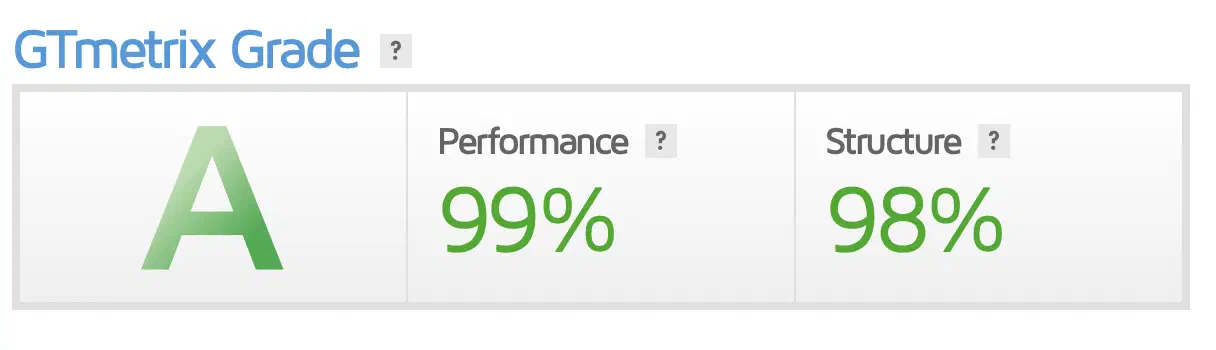
The speed of websites based on Hugo is a lot higher than websites in Wordpress. At least, that’s my experience. A Wordpress site is comprised of bits of program code (PHP) that, based on information from a database (MySQL), generates a page. Wordpress does this every time when you visit the page anew. You can adjust things, like assembling a theme for your website or special pages that only logged-in users can view. Obviously, in Wordpress, there are also smart options to make it quicker and there are plugins that save/cache the generated pages as static pages. These are then the ‘standard’ HTML pages that don’t change.
Hugo does something similar, namely generating static pages based on input and combining it with a theme. The big difference with Wordpress is that Hugo doesn’t do this at the moment you visit the page, but long before that time. Hugo creates the static pages from your ‘source code’, or the text of your article by formatting these by combining them with a theme. All this happens on the computer where you’re writing the articles, or, if you fully adopt the developers mentality, the moment you publish the article. This whole action ensures that all you need to do is upload static pages to your website (or push to your git repository). I conveniently categorize JavaScript files as static too for now.
For a visitor to your website, this means that, when they request a page, they get it served right away. No conversions, compilations from databases, and such.
Security
Security is another such thing because of which I find static pages a comforting idea. At the moment you want to create a page or article in Wordpress (or a similar system), you need to get this via the internet into the database. Wordpress has an onboard editor for this. You can enter your texts in a graphical environment, including formatting, which is then saved in the database.
Now I do know that there are also bits of Javascript in between, in which there can certainly be bugs, because of which all sorts of shady types can mess with your website in ways you don’t want them to. On the other hand, if there is no database in which data can be messed with, all you need to do to clean the website is to push the articles again. And obviously, replace the Javascript module that’s leaking with something else.
Loose Ends
Naturally, there are also some loose ends. There’s no possibility yet to respond to articles, for example. Since in principle you can’t write on a static site, you need to arrange some things for that. You can make use of services like Disqus or another service, or you can host something by yourself. I’m looking into hosting it by myself. When you host it yourself, you have control over everything that happens with the data that’s stored in your comment system. I still need to figure this out, but I think I’ll host it myself.
Trying It Out Yourself
Do you now think: “I want that too, static pages and a fast website, but how do I begin?”. That’s positive! Your first step!
In the future, I will write an article about how you can start with Hugo. If you don’t want to wait for that (very wise), take a look at the Hugo site.